
No current first-party Wurst Client NeoForge build was verified. Use Fabric for modern Wurst 7; ForgeWurst is a separate legacy project for Minecraft 1.10.2 through 1.12.2.
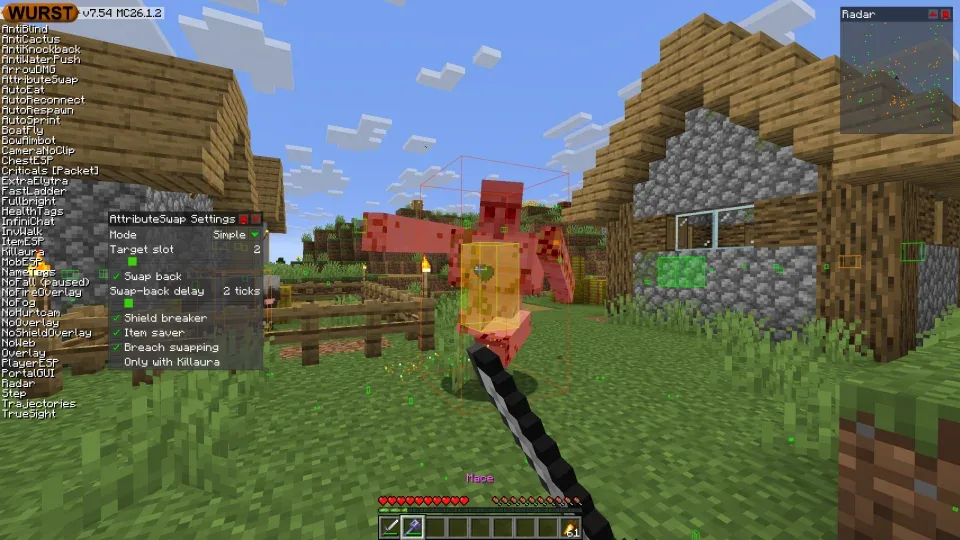
Wurst Client Forge and NeoForge compatibility table
A mod loader is not just a label in the launcher. Fabric, Forge and NeoForge expose different APIs and read different mod metadata. A JAR compiled for one loader usually cannot be placed into another loader's instance, even when both profiles use the same Minecraft version.
The table reflects first-party Wurst documentation checked September 19, 2026. It does not claim that every community port is malicious; it distinguishes those ports from the download files published by Wurst-Imperium and linked on this site.
| Project or loader | Minecraft range | Verified status | Use case |
|---|---|---|---|
| Wurst 7 + Fabric | 1.14.2 through 26.2 | First-party | Modern Wurst installation |
| Wurst 6 | 1.7.2 through 1.12.2 | Historical | Legacy standalone Wurst generation |
| ForgeWurst | 1.10.2 through 1.12.2 | Separate project | Historical Forge loader support |
| Modern Forge port | Varies | Not the file linked here | Evaluate its own source and maintainer |
| Modern NeoForge port | Varies | Not first-party verified | Treat as a separate community project |
Why modern Wurst Client uses Fabric
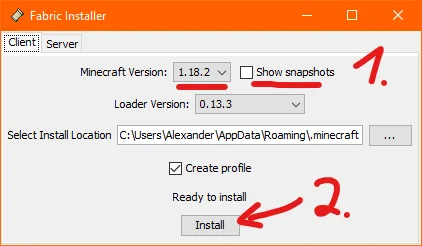
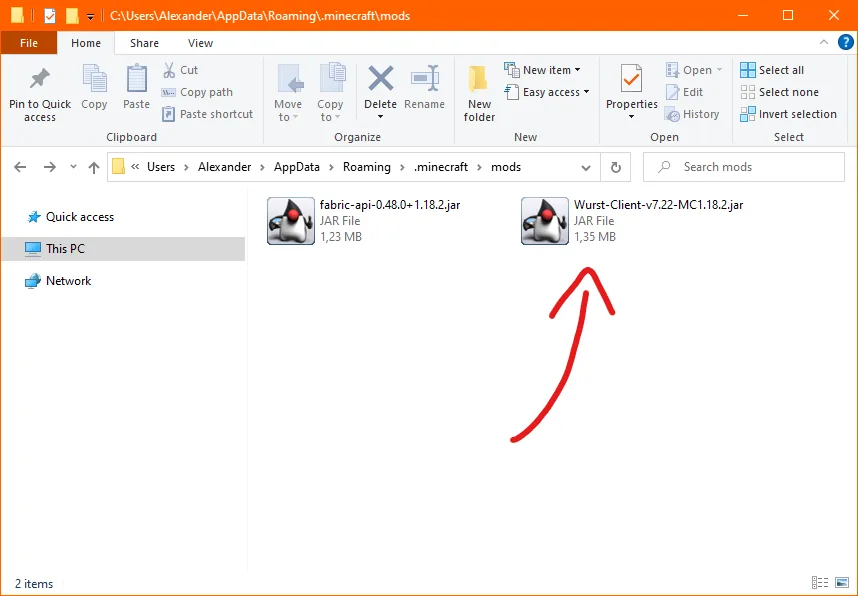
The current Wurst installation path is deliberately simple: create a Fabric Loader profile, add Fabric API, add the matching Wurst JAR and launch that profile. Current Wurst release pages provide a Fabric heading beside each Minecraft-specific download and link the corresponding Fabric API version.
Fabric Loader and Fabric API are separate downloads. The loader creates the modded runtime profile; Fabric API is a mod dependency placed in the mods folder. Wurst needs both pieces in the correct version context. Installing only Fabric API in a vanilla profile or installing only the Wurst JAR will not create a complete setup.
Use the exact Minecraft version in the Wurst filename. Wurst 7.55.1 has files for Minecraft 26.2 and 1.21.11, but the two JARs are different. The corresponding Fabric API files are also different.
Is there a Wurst Client Forge download?
There is a historical project called ForgeWurst, but its verified first-party installation range is Minecraft 1.10.2 through 1.12.2. That does not make a modern Wurst 7 Fabric JAR compatible with Forge 1.20.1, Forge 1.21.1 or another current Forge profile.
Search queries such as “Wurst Client 1.20.1 Forge download” combine a popular legacy modpack version with the wrong loader for the first-party Wurst 7 file. For Minecraft 1.20.1, the verified Wurst index currently points to Wurst 7.50.3 plus Fabric API 0.92.6+1.20.1. Create a separate Fabric instance rather than dropping those files into a Forge modpack.
If you genuinely need ForgeWurst for a legacy game version, use its own first-party project site and instructions. Do not assume the settings, features, update history or filenames match current Wurst 7.
What about Wurst Client NeoForge ports?
NeoForge is a distinct loader ecosystem. During this task, the current first-party Wurst download index, Wurst 7 repository and Wurst installation guide were checked, and the verified modern download flow remained Fabric-based. No current first-party Wurst-Imperium NeoForge build was established by those sources.
Search results and videos may feature projects named Wurst NeoForge. Treat each as a separate port with its own maintainer, source repository, release signing and update policy. A shared Wurst name or similar interface does not prove that the file came from Wurst-Imperium.
Before using any community port, inspect its source owner, release history, supported Minecraft version, dependency list and issue tracker. Do not install a binary from a video description or file host when you cannot connect it to a transparent project. This site links only the verified first-party Fabric files.
Keep Fabric, Forge and NeoForge in separate instances
The safest way to test Wurst without damaging an existing modpack is to create a new launcher instance. Set the same Minecraft version, choose Fabric, and begin with only Wurst and Fabric API. This preserves the original Forge or NeoForge pack and gives you a clean baseline for troubleshooting.
A global Minecraft mods folder is convenient for the official launcher but risky when several profiles share it. Multi-instance launchers solve this by isolating each version and loader. Confirm the folder shown by the profile before copying files, because editing the default directory may have no effect on an isolated instance.
Never keep multiple Wurst builds for different Minecraft versions in one active folder. Fabric will scan every JAR and can fail before the menu appears. Archive unused files outside the instance rather than renaming extensions or leaving them disabled by guesswork.
How to identify your current mod loader
Open the launcher profile or instance settings and look for Fabric, Forge or NeoForge next to the Minecraft version. Do not rely only on the mods folder name; the folder can contain stale files from a previous profile. The Minecraft title screen and crash report also identify the active loader.
When a mod manager offers an Import Mod button, it may filter files by loader metadata. A rejection is useful evidence that the selected instance does not match. When it imports without warning but later crashes, read the dependency section of the error report and compare it with the file facts on the relevant version page.
If you cannot determine the loader, create a clean Fabric profile by following the complete installation guide. That is more reliable than trying files one by one in an unknown modpack.
Wurst Client NeoForge, Forge and Fabric FAQ
Is Wurst Client a Fabric mod?
Modern official Wurst 7 releases are Fabric mods and require Fabric API.
Can I put Wurst Fabric in a Forge mods folder?
No. A Forge profile cannot load the verified modern Wurst Fabric JAR. Create a separate matching Fabric instance.
Which Minecraft versions does ForgeWurst support?
The first-party Wurst installation overview identifies ForgeWurst for Minecraft 1.10.2 through 1.12.2.
Is Wurst Client available for NeoForge?
No current first-party Wurst-Imperium NeoForge file was verified in the official sources checked. Community ports should be evaluated as separate projects.
Does Wurst 1.20.1 use Forge?
The verified Wurst 7.50.3 build for Minecraft 1.20.1 uses Fabric and Fabric API 0.92.6+1.20.1.
Can one launcher contain both Fabric and Forge?
A launcher can manage both, but keep them in separate profiles or instances with separate compatible mod folders.
Sources and related guides
Version and compatibility claims on this page were checked against first-party project pages.