
Run Minecraft once
Start the exact vanilla Minecraft version you plan to use, reach the title screen, then close the game. This creates the files the Fabric installer expects.
Use this Wurst Client download for Minecraft Java Edition to choose your game version and get the matching build from its verified GitHub release. This Wurst Client download page keeps the Minecraft version, Wurst version, Fabric API dependency and filename together so you do not install the wrong JAR.
Wurst-Client-v7.55.1-MC26.2.jar
Download Wurst 7.55.1 for MC 26.2Files are not repackaged or mirrored here. The Wurst button opens a first-party Wurst-Imperium GitHub Release after a 15-second source handoff.
Minecraft 26.2 is the game version. Wurst 7.55.1 is the client release. Each Wurst Client download for Minecraft must match your exact game version even when several files share the same Wurst release number.
Modern Wurst 7 installs like a Fabric mod. You need a licensed Minecraft Java Edition installation, the Fabric Loader profile, Fabric API and the Wurst JAR built for the same game version.
Start the exact vanilla Minecraft version you plan to use, reach the title screen, then close the game. This creates the files the Fabric installer expects.
Download Fabric Installer from Fabric's official site. Select the same Minecraft version, keep the default game directory unless your launcher uses a custom one, and create the Fabric profile.
Place the matching Wurst Client JAR and Fabric API JAR in the active instance's mods folder. Do not use a file ending in -sources.jar.
Open the Minecraft Launcher, choose the Fabric profile for that game version and press Play. If the game crashes, compare every version number before changing anything else.
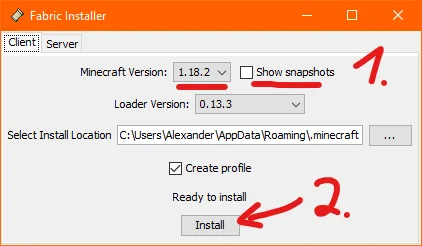
The most common setup error is mixing a Wurst JAR, Fabric API JAR and Fabric Loader profile built for different Minecraft versions. The labels should all agree before launch.
Open the complete Windows, macOS and Linux guideWurst download searches often mix operating systems, launchers, mod loaders and Minecraft editions. These are separate compatibility layers, so use the table before choosing a file.
| Environment | Status | What to use | Important note |
|---|---|---|---|
| Minecraft Java Edition | Supported | Wurst 7 + Fabric API | A licensed Java Edition copy is required. |
| Windows / macOS / Linux | Supported | The same matching JAR files | Only the location of the game directory differs. |
| Fabric | Recommended | Modern Wurst 7 builds | Keep Wurst, Fabric API and Minecraft versions aligned. |
| Forge / NeoForge | Limited | Read the loader guide | Modern official Wurst 7 downloads shown here are Fabric builds. |
| Feather Client / Dawn | Launcher-dependent | Custom Fabric mod support | Feather states it was acquired and users are being moved to Dawn. |
| Minecraft Bedrock | Not supported | No Wurst download | Java JAR mods cannot run in Bedrock Edition. |
| Eaglercraft HTML | Not verified | Avoid files claiming to be official | Official Wurst downloads are Java mod JARs, not HTML clients. |
Wurst 7.55.1 was published on August 29, 2026. The official GitHub release lists stable builds for Minecraft 26.2, 26.1.2 and 1.21.11, plus separate snapshot builds. This page was checked on September 19, 2026, and the stable selector intentionally shows the two versions most strongly represented in current search demand.
The release includes AttributeSwap and bug fixes alongside the existing Wurst interface, Navigator and TabGUI. Release notes can change without the game version changing, so this site records both the Wurst release number and its update date rather than calling every file simply “latest.”
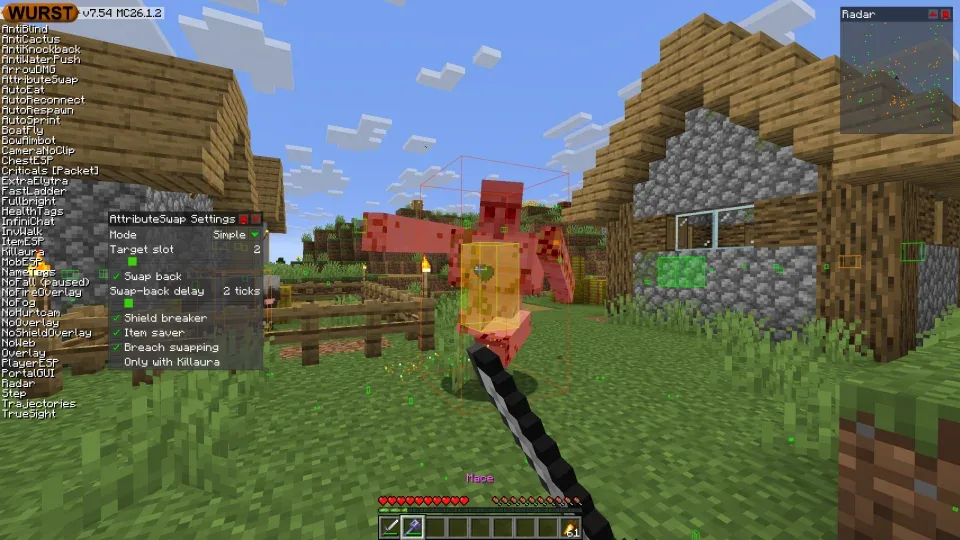
Wurst is open source, but that does not make every third-party mirror trustworthy. Check the filename and use the first-party GitHub Release or official Wurst download page. This site does not alter the JAR.
Wurst is a hacked client. Multiplayer servers can ban accounts for prohibited modifications or behavior. Review the rules of any server before connecting; a successful installation does not mean use is permitted.
This Wurst Client download page answers the version, loader and platform questions that most often lead to the wrong download.
As checked on August 13, 2026, Wurst 7.54.1 is the current release listed for Minecraft 26.2 and Minecraft 1.21.11. “Latest” depends on your Minecraft version, so download the file whose filename includes your exact game version.
Select Minecraft 1.21.11 in the homepage matcher or open the dedicated Wurst Client 1.21.11 download page. Install Fabric Loader, then put Wurst 7.54.1 for MC1.21.11 and Fabric API 0.141.5+1.21.11 in the same active mods folder.
Yes. The verified first-party build is Wurst 7.54.1 for Minecraft 26.2. It is a Fabric mod and needs Fabric API 0.157.0+26.2. Minecraft 26.2 is the game version; Wurst 7.54.1 is the client release.
Yes, Wurst's Java mod JAR can run on supported Minecraft Java Edition installations on macOS. Install Java and Fabric for your launcher, then use the instance's actual mods folder. macOS may ask you to approve downloads from the browser or open the Fabric installer with Java.
Feather advertised support for adding custom Fabric mods, but its website now says Feather was acquired and users are being moved to Dawn. Use the launcher's custom mod controls only if the selected instance supports the same Fabric and Minecraft versions. See the Feather and Dawn guide for the compatibility checklist.
Modern official Wurst 7 builds in the current release pages use Fabric. The historical ForgeWurst project covered Minecraft 1.10.2 through 1.12.2. Treat modern Forge or NeoForge downloads from unrelated sources as separate community projects, not the verified files linked here.
There is no verified official Wurst Client download for Minecraft Bedrock Edition or an Eaglercraft HTML build. Official modern Wurst downloads are Java Edition mod JARs. A renamed HTML, APK or Bedrock package is not equivalent to the official project.
Check for four common mismatches: wrong Minecraft version in the Wurst filename, wrong Fabric API version, an outdated Fabric Loader, or accidentally installing the -sources.jar. Also confirm you edited the mods folder for the profile you actually launched.
Preparing the selected file.
Checking the destination and preparing your official-source link.