
Wurst Client can be downloaded safely when you use the first-party Wurst-Imperium release, confirm the exact Minecraft target in the JAR filename, install it in a clean Fabric instance and keep your Microsoft credentials away from third-party pages. That does not mean every mirror is safe, that the client is undetectable, or that a server allows it. Treat file authenticity, local security, privacy and server rules as four separate checks.
What does “safe” mean when people ask about Wurst Client?
The query is usually asking several things at once: is the download file authentic, is it likely to be malware, will it expose a Microsoft account, and can a server ban the player? Those are not the same question. A first-party Java JAR can be the correct project file while the way it is used still creates server or account risk.
This page does not promise that any file is malware-free forever. It explains how to reduce avoidable risk using a verifiable release, a matching Minecraft and Fabric setup, local scanning, a clean test instance and responsible multiplayer decisions. If a download asks for a password, a CAPTCHA before a file, an EXE installer or a browser extension, stop and reassess instead of treating the brand name as proof.
| Question | What you can verify | What remains your responsibility |
|---|---|---|
| Is the file authentic? | Release owner, tag, filename, Minecraft target and source handoff | Download from the verified destination and keep the original file name |
| Is the local install controlled? | Fabric profile, matching dependency and clean-instance behavior | Scan locally, back up worlds and avoid unrelated launchers or wrappers |
| Is multiplayer use allowed? | Only the server’s published rules and moderation policy | Read rules first; a working client never grants permission |
Use the official release before judging a Wurst Client download
For this site’s August 13, 2026 freshness check, the current verified Wurst release is v7.54.1, published on August 4, 2026. The official Wurst-Imperium GitHub release lists separate stable JARs for Minecraft 26.2, 26.1.2 and 1.21.11. The release tag, owner and asset filename should agree; a page that merely copies the Wurst name is not the same evidence.
The download buttons on this site hand the request to the project-owned GitHub release instead of hosting or repackaging the binary. Open the destination and confirm that the repository is Wurst-Imperium/Wurst-MCX2, the tag is v7.54.1 and the asset name contains the Minecraft version you actually launch. A stable link can still change after a new release, so recheck the official page when the version is updated.
Do not use a search result, video description, URL shortener or “premium” mirror as a substitute for the release owner. The official download index and the version directory help you choose the target, while the release page is the place to verify the actual asset.
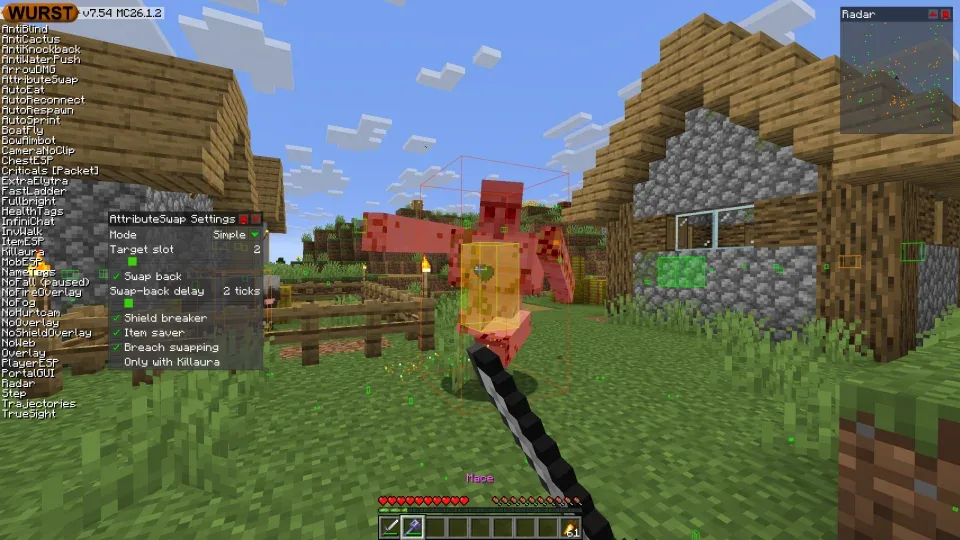
Match the JAR filename, Minecraft version and Fabric API
A safe Wurst Client download still has to be the right download. The MC suffix identifies the Minecraft target, while v7.54.1 identifies the Wurst release. Do not rename a JAR to make it fit another profile, and do not install a -sources.jar archive as if it were the playable mod.
The current stable file facts below were checked against the official release metadata. The displayed size is a useful identity clue, not a replacement for source verification: CDN responses, future releases and browser downloads can change. Compare all of the fields before moving the file into an active mods folder.
| Minecraft target | Wurst release | Expected JAR | Checked size | Fabric API |
|---|---|---|---|---|
| 26.2 | 7.54.1 | Wurst-Client-v7.54.1-MC26.2.jar | 1.78 MB (1,865,681 bytes) | Fabric API 0.157.0+26.2 |
| 26.1.2 | 7.54.1 | Wurst-Client-v7.54.1-MC26.1.2.jar | 1.78 MB (1,863,515 bytes) | Fabric API 0.155.2+26.1.2 |
| 1.21.11 / 25.4 | 7.54.1 | Wurst-Client-v7.54.1-MC1.21.11.jar | 1.77 MB (1,850,835 bytes) | Fabric API 0.141.5+1.21.11 |
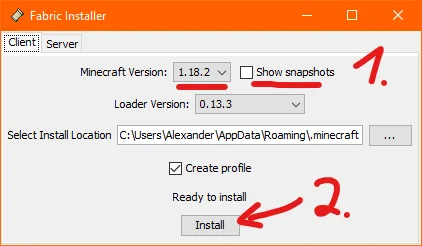
Install Wurst Client in a clean, reversible test instance
A clean instance is a practical safety control because it limits what is running and makes a crash easier to investigate. Use the installation guide to create the matching Fabric profile, then test with only Wurst and the required Fabric API before adding other mods. Do not copy a whole unknown modpack into the folder and assume every JAR came from the same source.
Before first launch, keep a backup of important worlds and configuration. Use a new single-player world for the first functional test. If the game reaches the title screen and the client UI loads, that confirms a basic compatibility path; it does not certify the file against every threat or tell you that a server will accept the client.
- Run the exact vanilla Minecraft version once, then close it before installing Fabric.
- Install Fabric Loader for that same version and open the instance’s actual
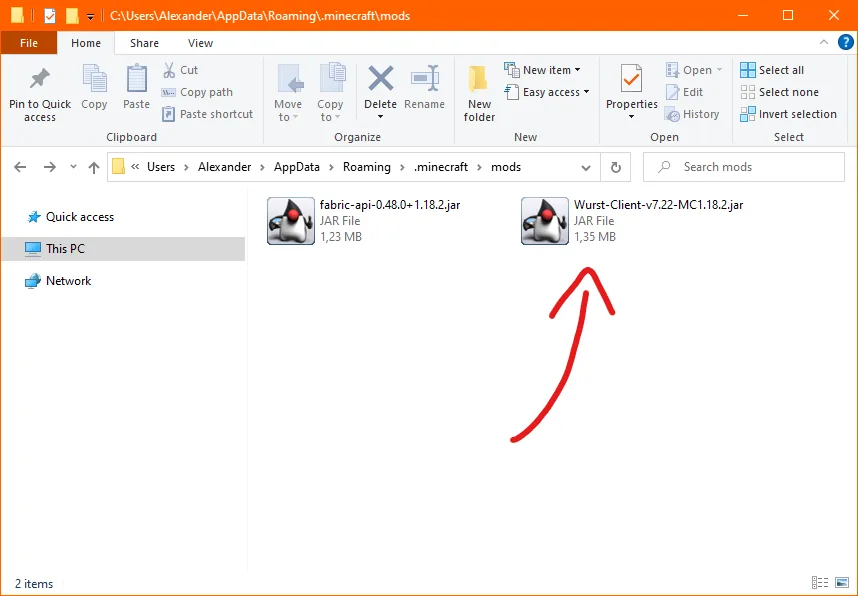
modsfolder. - Place only the matching Wurst JAR and Fabric API there; keep filenames and extensions visible.
- Scan the downloaded files with your normal, updated local security software and investigate any warning before launching.
- Start a new local world, test one change at a time and add other trusted mods only after the minimal profile works.
Download and privacy red flags that should stop the install
The most useful safety decision is often knowing when not to continue. A third-party page may use the Wurst name, logo or screenshots while delivering a different binary. Treat the following signals as reasons to close the page and return to the first-party release rather than trying to “clean” the package yourself.
Never enter a Microsoft password, session token or recovery code to unlock a mod download. Wurst should not require an EXE, APK, browser extension, paid unlocker, remote-control tool or a second launcher merely to place a Java mod JAR in a Fabric instance. A CAPTCHA that appears before a normal project release, repeated redirects, or a forced notification permission is also a warning sign.
- A download is an EXE, APK, ZIP installer or bundled launcher instead of the expected Java
.jarasset. - The page asks for Microsoft credentials, a Discord token, a CAPTCHA answer, browser notifications or an extension.
- The URL hides the final owner behind a shortener, countdown chain or unrelated file host.
- The package promises to be “undetectable,” “ban-proof,” cracked, premium or able to bypass server moderation.
- The Minecraft suffix, release tag, file size or Fabric API target does not match the profile you intend to launch.
- The download includes an unknown DLL, Java launcher, password-protected archive or instructions to disable security tools globally.
Technical safety does not remove server or account risk
Wurst Client is a hacked client, so the server question is separate from the file question. Many multiplayer servers prohibit hacked clients or specific modules. A client can load correctly and still lead to a kick, temporary suspension or permanent ban when the server’s rules prohibit the behavior. Read the rules before connecting and do not treat a working download as permission.
Privacy risk also depends on what you add around the client. Keep Microsoft credentials out of third-party launchers, avoid unknown “account fix” tools and do not paste logs containing tokens into public chats. Use a licensed Minecraft account, a separate test world and a reversible instance. If you need ordinary multiplayer play, a vanilla or server-approved mod setup is the lower-risk choice.
| Risk area | Safer decision | Do not assume |
|---|---|---|
| File authenticity | Use the Wurst-Imperium release and compare the asset name | A logo or repost proves the binary is genuine |
| Account privacy | Keep passwords and tokens outside download flows | A wrapper is safe because it uses the Wurst name |
| Multiplayer permission | Read each server’s rules before joining | A client that launches is allowed everywhere |
A five-minute Wurst Client safety checklist
Use this short routine whenever you download or update the client. It is intentionally boring: repeatable checks are more useful than a dramatic claim that a file is completely safe. Keep a dated note of the release tag, Minecraft target, Fabric API, filename and source URL so you can explain exactly what was installed later.
If any answer is uncertain, pause at that step. The correct fallback is the official release or the matching version page, not a second mirror chosen because it has a faster button.
- Is the page on the official Wurst download or Wurst-Imperium GitHub release path?
- Does the tag and asset name say
v7.54.1and the exact Minecraft target you use? - Does the file remain a Java
.jarwith no password, installer or bundled executable? - Does the Fabric API target the same Minecraft version and sit in the same active instance?
- Did local security software allow the file, and did a minimal single-player test work before other mods were added?
- Have you read the server rules and kept Microsoft credentials out of every third-party download step?
Is Wurst Client safe? FAQ
Can I download Wurst Client safely?
You can reduce download risk by using the first-party Wurst-Imperium release, matching the Minecraft filename and Fabric API, scanning locally and testing a clean instance. No website can promise that every mirror or future package is safe.
Is the official Wurst Client release malware?
This page does not make a universal malware certification. It distinguishes the official Java release from repackaged installers and recommends source verification plus local security checks. Do not treat a third-party repost as official.
Is Wurst Client bannable?
Server rules decide that. Many servers prohibit hacked clients or individual modules, and a successful installation does not make multiplayer use permitted or undetectable.
Is a Wurst Client APK or EXE safe?
Official modern Wurst downloads are Java Edition mod JARs. An APK, EXE installer or bundled launcher is not the expected release asset and should be treated as a red flag until independently verified by the project owner.
Does Wurst Client need my Microsoft password?
A normal Wurst JAR download should not ask you to submit a Microsoft password, token or recovery code. Close pages that require credentials to unlock a file and use the official release path instead.
Which Wurst version was checked for this guide?
The release and stable asset facts were checked on August 13, 2026. The current verified release was Wurst 7.54.1, with separate stable JARs for Minecraft 26.2, 26.1.2 and 1.21.11.
Sources and related guides
Release ownership, stable asset names, dates and file sizes were checked against the official Wurst-Imperium GitHub release on August 13, 2026. Installation and loader guidance links to the site’s matching version pages and Fabric source pages.